

Pack smart. Enjoy the journey.
You've been looking forward to this trip. The rain jacket is packed. The adapter is in your bag. And the train ride along the coast is yours to enjoy. journeybot brings your route, packing and practical details together, so you can leave feeling prepared.

Private. Works offline. No account needed.
iPhone · iPad · Mac · Apple Watch
The best packing list app in the App Store, full stop!
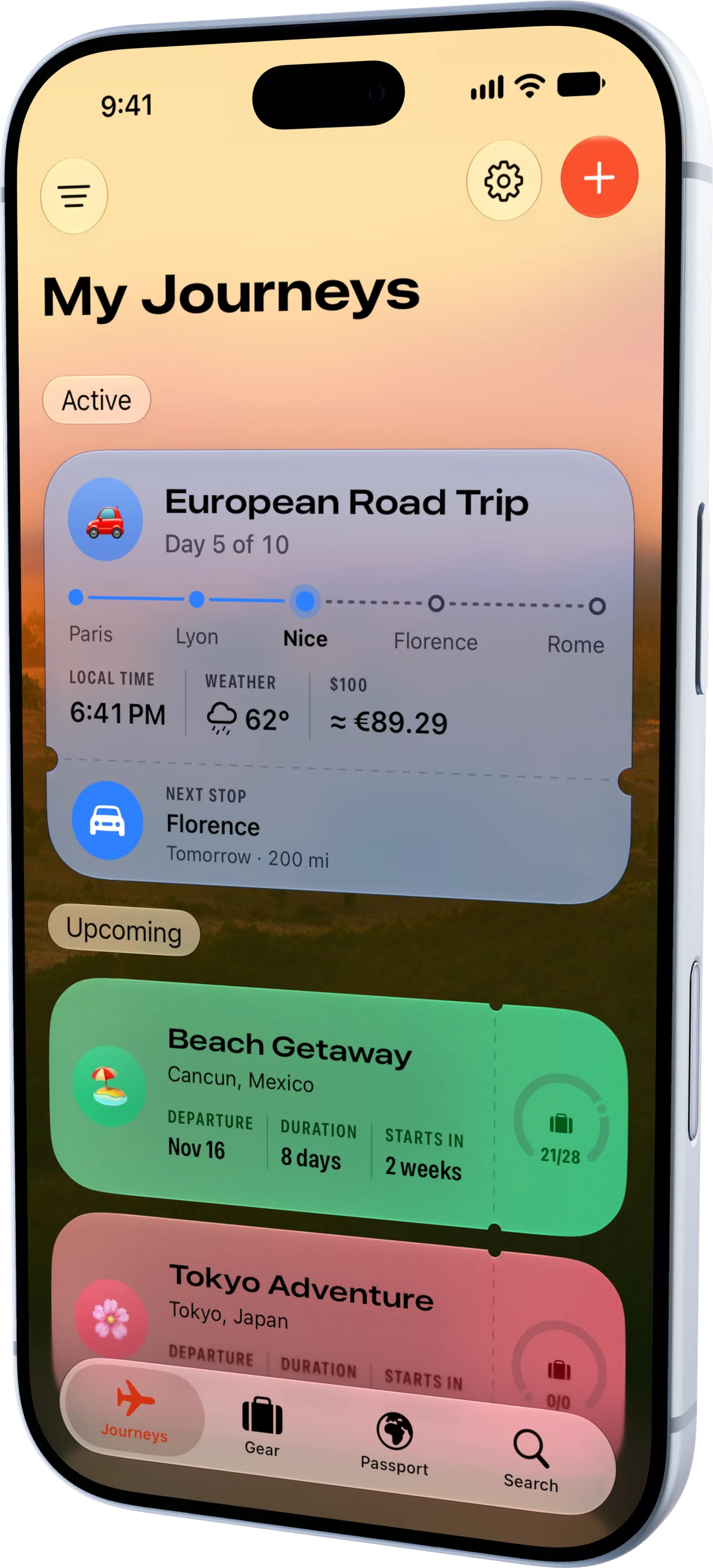
Remember what matters
Start with a packing list built around your stops, your plans and the bags you actually own.
Whatever the weather brings
Sunshine in Nice, rain in Florence. See the forecast for every stop, or seasonal weather for trips further out.
Your list, wherever you land
On the plane, at the cabin, or somewhere with no signal, your packing list still works. Your plans stay private.
New in journeybot 2.0
More to look forward to.
A place you've always wanted to see. A route with room for one more stop. journeybot 2.0 helps you turn those plans into a trip, feel ready to leave and revisit it when you're home.
Multi-stop journeys
Make time for the places you want to see.
Two nights in Nice, three in Florence, then on to Rome. Give each stop the time you want to spend there, and your dates fall into place. See how the route comes together on one map, with driving distances and times to help you plan the days on the road.
- Weather, local time and currency for every stop
- Road trips by car or campervan
- Packing lists for the whole journey
Gear
Bring your own bags.
Your favorite backpack. Your well-traveled suitcase. Add your bags with photos and give each item a home, so you know where the adapter went. When it's time to pack, work through one thing at a time: Packed, Later or Not taking it.
- The bag type decides what fits inside
- Reuse your bags in packing templates
- Packing mode, at your own pace
Passport
Keep the memories.
That weekend you still talk about. The long trip that feels like yesterday. Find them in your Passport, bring older journeys in from your photo library and share a recap. Look back at the places you've been and the days you spent away.
- Import past trips from your photos
- Trips, countries and days away each year
- Share a travel recap
Bucket list
Save the trips you keep talking about.
A quiet island, a city you've never seen, a trail worth the climb. Keep travel ideas with places, rough timing and activities, and turn one into a journey when you're ready.
- Ideas are free and unlimited
- Find suitable travel months with Premium
- Get a planning reminder three months ahead with Premium
Every Apple device
Plan on your Mac. Pack on your iPhone.
Plan the route at your desk, pick up your list by the suitcase and tick off packed items from your wrist. Your journeys stay in sync through iCloud, so you can carry on wherever you are.
Mac
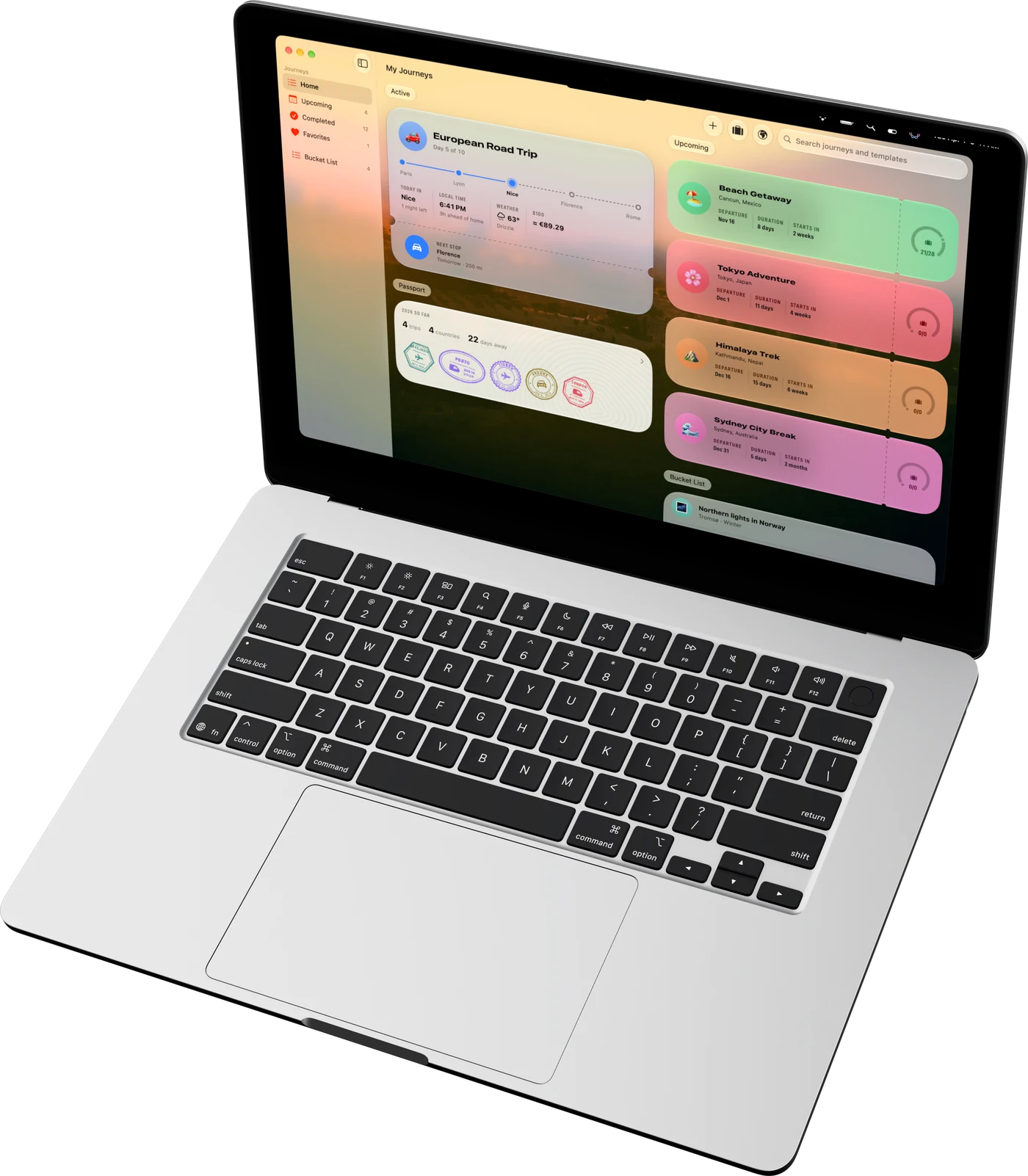
A native Mac app with a sidebar for your journeys, and Gear and Passport in their own windows.
Apple Watch
Tick off packing items, see your stop's weather, local time, plugs and currency, and count down with a complication.
iPhone Duo
Layouts that adapt to the fold, so your route and your list sit side by side.
iPad
The whole app on a bigger screen, with the same journeys on every device.
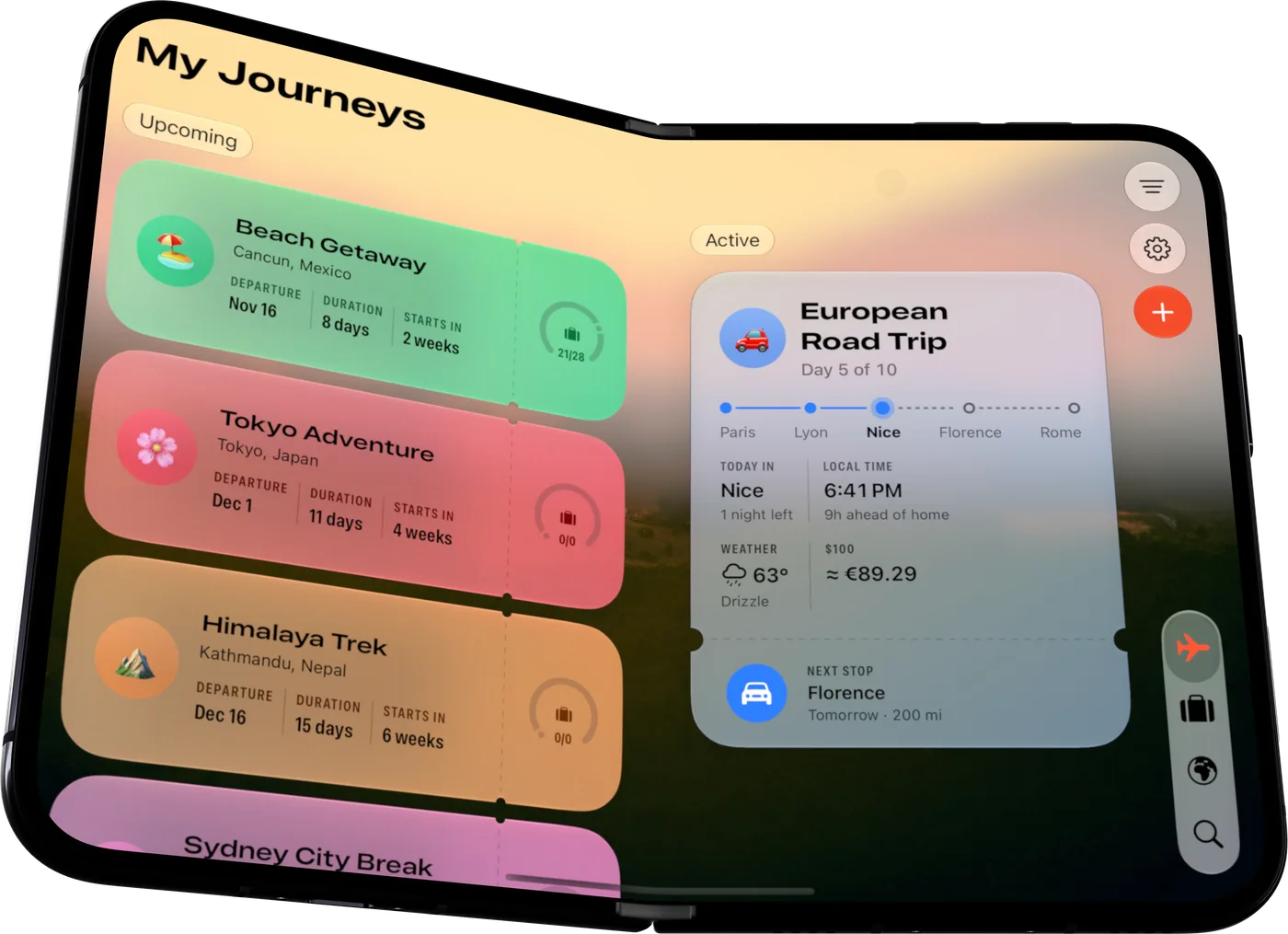
Made for the fold.
On iPhone Duo, journeybot puts both halves to work: your journeys beside the trip under way, the route beside its travel essentials, and your packing list beside its items. Prop it up like a small laptop and use the new dedicated packing mode to pack like a pro.
Free Travel Tools
A little less airport guesswork.
Before the early alarm and the dash to departures, settle three of those little travel worries.
Free to use. No account or download needed.
Will my bag fit?
Enter your bag’s measurements and see which airlines it fits — and where you might need an extra allowance.
Can I bring this through security?
Check the liquid limits at your departure, connection, and return airports before you pack your toiletries.
Will my chargers work?
Compare sockets and voltage at home and at your destination to see if you need an adapter or a converter.
The journeybot app
Make room for the journey.
Will you need a jacket at the next stop? Did you pack your medication? Which adapter should you bring? Let journeybot help you work through the little uncertainties before you leave.
Smart Packing
Your AI packing list, built for the whole trip.
A few days by the sea, then a walk in the hills. Your packing list considers the weather and activities at every stop, along with your dates and bags. Generate it on your device, or choose Apple Private Cloud Compute on iOS 27 for more detailed lists when available. Magic Templates work without Apple Intelligence, and you can import a checklist you already use.
Pack for the actual weather
Live 10-day forecasts for every stop on near-term trips. For journeys further out, journeybot uses historical seasonal data so you know what to expect months in advance. Turn on journey reminders and it nudges you with the outlook as your trip nears.
Tipping Customs
Know when and how much to tip in every country on your route, with amounts by service, service-charge guidance and links to sources.
Journey Hub
Find your feet.
The details are here.
You've arrived. Check the local time before calling home, find the plug type for your charger and look up tipping customs before dinner. Weather, currency, upcoming plans and reminders stay together for each stop, with your current or next trip at the top of your list.
Private by Design
Smart suggestions run on your device by default, and you choose whether to use Apple Private Cloud Compute instead. Your travel plans stay yours — and sync privately across all your Apple devices via iCloud, no separate account needed.
Premium
Unlock everything.
Monthly or yearly subscription, or a one-time lifetime purchase.
Siri & Shortcuts
Just ask Siri.
Ten voice commands that work the moment you install journeybot — nothing to set up. Ask what's left to pack, add items and check them off hands-free, or drop any journeybot action into your own Shortcuts automation. On iOS 27, you can also just ask Siri to remind you about something — journeybot files it under the right trip.
How to pack with Siri- What's left to pack in journeybot
- Did I pack all my essentials in journeybot
- When's my next trip in journeybot
- Add an item to my journeybot packing list
- Do I need a plug adapter for my journeybot trip
And in Spotlight. Your journeys are indexed by name and destination. Type a city from the Home Screen and go straight to the trip.
Trip Reminders
Check-in times, a booking to confirm, anything you'd rather not carry in your head. Add reminders to a journey, give them a time, and journeybot notifies you. On iOS 27, just ask Siri.

Currency Conversion
Convert on the fly — even offline, and free for everyone. Supports basic math so you can type 100+50 and convert 150 directly.
USD
EUR
€ 89.87
Boarding Pass Widget
Your next journey as a boarding pass in its own color, with a countdown stub and packing progress. Now in extra large on iPad and iPhone, and while you're away it counts down to the end of your trip.
Paris Weekend
Packed
Starts in
11d
New York Trip
Packed
Starts in
38d
Baggage Check
Before your flight, journeybot reminds you to move restricted items out of checked bags — batteries, power banks, lighters, and more.
Visual Packing
Snap a photo of anything you're packing and journeybot lifts it out of the background and onto your list as a clean sticker — so your list looks like your actual gear. Five free, unlimited with Premium.
Apple Intelligence
Powered by Apple Intelligence
Smart packing lists tailored to your trip, weather summaries for your destination, and custom journey icons created with Genmoji. Available on supported devices, processed privately on your iPhone — or, on iOS 27, with Apple Private Cloud Compute when you switch it on.
Apple Health
journeybot reads your medications from Apple Health and adds them to your packing list automatically, so you never leave them behind.
Time Zones
Local Time
See the current time at your destination — and yours — at a glance. Each time of day has its own color scheme so you know instantly if it's a good moment to call ahead. Available in your journey details screen, and as a home screen widget.
San Francisco
14:36
Paris
23:36
Coming Soon
Visa & Health Requirements
Less last-minute searching before every trip. journeybot will show entry rules, vaccination requirements, and health advisories for your destination.
4.9 out of 5 on the App Store
The best packing list app in the App Store, full stop!
“journeybot is the unicorn packing list app I've been looking for. Gorgeous looking. Amazing feature set. Highly intuitive and makes use of all the latest iOS capabilities like widgets and Siri.”
Cutting Edge Packing App
“By far, this is the most advanced packing app I have seen.”
A total lifesaver for anxious packers like me
“I used to dread packing, always worried I'd forget something important. It genuinely reduces my travel anxiety. I pack knowing everything's covered.”
Fantastic!
“I used to use a combination of apps to plan my trips. This has it all in one place. The insights are unobtrusive and useful.”
A truly useful app for travelers
“The design is beautiful, the UX is fantastic, and it's very simple and intuitive to use. Great job!”
Really useful app for travel prep
“I like how quick it is to set up a trip and get a solid packing list right away. Big plus for working offline and not needing an account. Clean design too.”
Packing List Blog
Packing lists for real trips.
Start with a focused guide, then use journeybot to turn it into a packing list matched to your destination, weather, activities, and luggage.
Browse all packing guidesWeekend City Break Packing List
A compact 2-3 day checklist for city trips, walking days, and dinner plans.
Carry-On Packing List
Pack lighter for short trips and avoid the checked-bag shuffle.
Beach Holiday Packing List
Sun, swim, sand, and the easy-to-forget extras.
Business Trip Packing List
Work-ready clothes, tech, documents, and travel-day essentials.
Stay in the loop
Get updates on new features and travel tips.
I built journeybot while preparing for a month-long trip to New Zealand. I wanted something built around the trip, not another template.
It works offline, keeps your data private, and doesn't require an account.
— Michal Ferák, Founder
Frequently Asked Questions
Is it free to use?
Yes. As a free user, you can have 3 active journeys with up to 2 stops each, generate 1 smart packing list, create 1 custom bag and 3 packing templates, and import 3 past trips into your Passport. journeybot Premium removes these limits and is available as a monthly subscription, a yearly subscription (with a 2-week free trial), or a one-time lifetime purchase.
Can I plan a trip with several stops?
Yes. Since journeybot 2.0, a journey can have several stops. Add each place, choose how many nights you'll stay, and your dates are worked out for you. You'll see the whole route on a map, with driving distances and times for road trips, and every stop gets its own weather, local time and currency. Two stops per journey are free; Premium removes the limit.
Is there a Mac and Apple Watch app?
Yes. journeybot 2.0 is a native Mac app with a sidebar for your journeys and Gear and Passport in their own windows. On Apple Watch, you can tick off packing items and see your current stop's weather, local time, plug types and currency, with a countdown complication for your next trip. Everything syncs through iCloud.
What is the Passport?
Your Passport is where finished journeys go. Each one earns a stamp, and you can look back on your trips, countries and days away each year. You can also import past trips from your photo library (you review each one before it's saved) and share a travel recap.
Do I need to create an account?
No. journeybot uses your existing iCloud account to keep your data in sync across devices. There's no separate account to create and no extra passwords to remember. Syncing requires an iCloud account to be enabled on your device.
Does it work offline?
Yes. journeybot works offline, so you can view your journeys, generate packing lists, check off items, and make edits without an internet connection. Changes will sync automatically once you're back online. Some features, like weather reports, require an internet connection.
Is my data private?
Yes. Your journey data is stored securely in your own iCloud account and stays under your control. We don't have access to your travel plans or packing lists. Learn more in our Privacy Policy.
Are smart packing lists generated on my device or in the cloud?
You choose. By default, journeybot generates smart packing lists on your device with Apple Intelligence — offline. One smart packing list generation is included free; Premium removes that app-level limit. On iOS 27, you can switch to Apple Private Cloud Compute in Settings for stronger suggestions. It needs an internet connection and has a daily limit set by Apple, and Apple designed it so your request isn't stored or accessible to Apple.
Can I use Siri to check my packing list?
Yes. journeybot ships ten built-in Siri commands that work as soon as you install it — nothing to set up. Ask "what's left to pack in journeybot" or "did I pack all my essentials in journeybot", add items and check them off by voice, create a journey, or ask whether your destination needs a plug adapter. See the full list in Pack With Siri.
Does journeybot work with Shortcuts and Spotlight?
Yes. Every journeybot action is available in the Shortcuts app — including ones with no spoken phrase, like searching journeys and getting days until departure — and each returns a real value you can branch on in your own automations. Journeys are also indexed in Spotlight by name and destination, so typing a city from the Home Screen opens the trip directly.
Is journeybot an AI travel planner?
journeybot is a private trip preparation app, not a generic chat-based travel planner. It uses Apple Intelligence — on your device by default, or Apple Private Cloud Compute if you choose — to help create packing lists and prepare for your destination, while keeping your journey details on your device and in your iCloud account.
Is journeybot a PackPoint alternative?
Yes, journeybot can be a PackPoint alternative if you want a packing list app focused on private, Apple-native trip preparation. It builds packing lists around your destination, dates, weather, activities, and luggage, and core packing features work offline. See a full comparison with PackPoint.
How is journeybot different from Packr?
journeybot is designed as a broader trip preparation app, not only a reusable packing checklist. Alongside smart packing lists, it keeps a multi-stop route, journey details, weather context, power adapter guidance, currency conversion, and home screen widgets together in one place. See a full comparison with Packr.
Is journeybot a TripIt alternative?
journeybot is not a full itinerary management replacement for TripIt. It is a focused alternative for people who mainly need smart packing lists and pre-trip preparation rather than flight, hotel, and reservation aggregation.
What is Journey Intelligence?
Journey Intelligence helps you prepare for your destination by checking things like visa requirements, vaccination rules, and weather conditions. It's designed to give you peace of mind while respecting your privacy. Journey details are never stored on our servers.
Which devices are supported?
journeybot runs on iPhone and iPad with iOS 26 or later, on Mac with macOS 26 or later, and on Apple Watch with watchOS 26 or later. Some Journey Intelligence features require a compatible device that supports Apple Intelligence, and the optional Apple Private Cloud Compute model requires iOS 27.
Is journeybot a PackGoat alternative?
Both apps are Apple-only and use Apple Intelligence and WeatherKit to generate weather-aware packing lists. PackGoat focuses on the packing list itself and adds trip sharing with travel companions and bag weight tracking. journeybot covers a broader scope: local time comparison, currency conversion, tipping customs, baggage restriction checks, and multi-stop route planning alongside smart packing. iCloud sync is also free in journeybot, while PackGoat requires a Pro subscription for it. See a full comparison with PackGoat.
Is journeybot a Packing Pro alternative?
Yes. Packing Pro is one of the original packing list apps, built around an 800+ item catalog and deep customization — but its last App Store update was in May 2022. journeybot is a modern, actively developed alternative that generates your packing list with Apple Intelligence from your destination, dates, weather, activities, and luggage. See a full comparison with Packing Pro.